


ABC Kids: Tracing & Learning
4.343.00 Reviews
App Specs
- Version
- 9.9
- Updated On
- License
- Free
- Downloads
- 10,000,000+
- Developer
- BayBee Brain
- Categories
- Educational
- Platform
- Android
Screenshots
 Analysis by AppCompare
When I look for a first letter-learning game for a young child, I want more than bright colors: the activities should make sense together, invite a child to try rather than just watch, and be simple enough to return to without a grown-up taking over. ABC Kids: Tracing & Learning aims at that early-learning sweet spot, with letter practice and playful activities built around it. My overall impression is of a cheerful, approachable game that can give a short stretch of screen time a clear purpose, provided an adult treats it as practice rather than a replacement for reading, drawing, or conversation.
Where it fits into a child’s day
I can see this being most useful in small doses: a few minutes while a parent prepares dinner, a quiet activity during a wait, or a gentle way to revisit letters after a book. The game’s educational focus is specific, which is a strength for children beginning to notice letter shapes and sounds. It is less suited to a child who already wants longer stories, open-ended exploration, or a broader range of school subjects. If your goal is simply to keep a child occupied for a long stretch, I would choose something else; this works better as a short, shared learning activity.
A practical routine is to let the child choose one activity, then ask them to point out a letter on a book cover or sign afterward. That small offline step helps connect tapping and tracing with the letters they meet in daily life. I would keep the session relaxed: a child who loses interest can stop, rather than being pushed to finish a sequence. The game is most valuable when it starts a little curiosity, not when it becomes a test.
Getting Started with the App
First off, downloading and setting up ABC Kids: Tracing & Learning is a breeze. It's available on both Android and iOS, and the app is free, which is always a bonus in my book! Once you open it, you're greeted with a colorful and friendly interface that immediately draws kids in. It's clear right from the start that the developers have put a lot of thought into making this app appealing to young minds.
Interactive Learning Experience
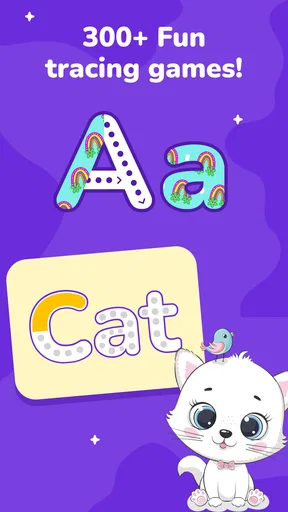
The main feature of the app is its interactive tracing activities. Kids can trace letters with their fingers, and the app provides immediate feedback with fun sounds and visual effects. I noticed that this not only helps in recognizing letters but also in developing fine motor skills. The app includes uppercase and lowercase letters, which is perfect for helping kids understand the difference.
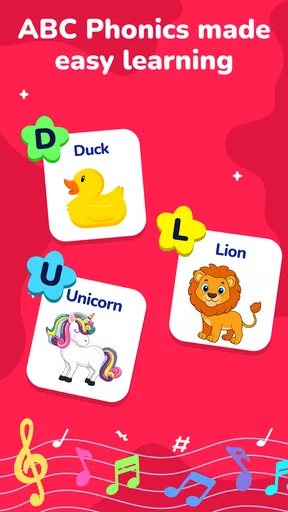
One thing that really impressed me was the inclusion of a phonics section. This feature helps kids associate sounds with each letter, creating a strong foundation for reading. The app uses a friendly voice to guide kids, making the learning process enjoyable and less like a chore.
A Variety of Fun Activities
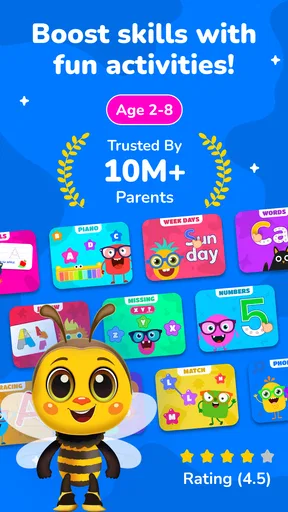
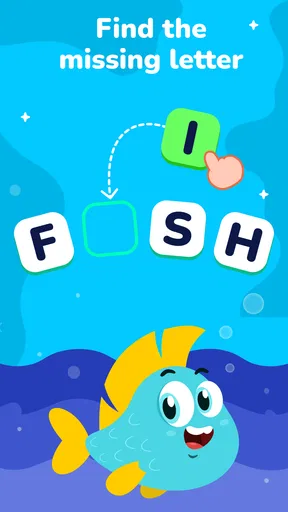
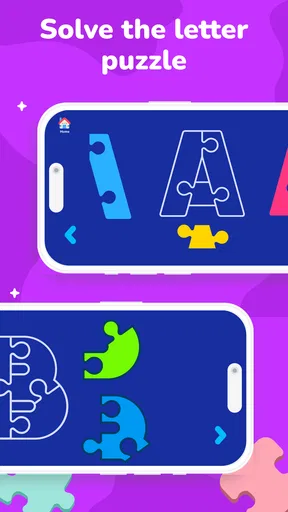
Besides tracing, ABC Kids: Tracing & Learning offers a variety of activities that keep kids engaged. There's a matching game where kids can connect letters with objects that start with that letter. It's a great way to reinforce what they've learned and introduce some vocabulary.
Worth Reading Before You Choose

Flipboard Shows What News Apps Must Do Beyond the Feed

Switching to Android Auto Means Rethinking Your Driving Routine

Google Calendar Makes a Crowded Week Easier to Manage

Ludo King Makes the Most of the Minutes Between Plans

Baby Panda World Brings Quick Play to Modern Phones, but Its Game Library Feels Busy

ESPN’s Live Game View Makes Following Close Games Easier
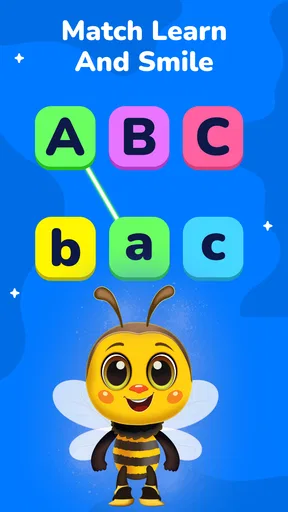
I also appreciated the "Letter Matching" game which challenges kids to match uppercase letters with their lowercase counterparts. It’s a simple yet effective way to reinforce letter recognition and ensure the knowledge sticks.
What the playful art and pacing do well
The colorful presentation gives the activities a friendly, low-pressure feel. Rather than asking a child to sit through a lesson, the game makes its central task physical: move a finger along a letter, notice what happens, and try again. That combination of a visible shape, touch, and sound gives a young learner several ways to engage with the same idea. I think this is a more useful design choice than decoration for its own sake, because the playful feedback can make practice feel inviting without changing the basic goal.
The pace also suits brief attention spans better than a long, uninterrupted lesson. A child can focus on a single letter or switch to a different kind of activity when tracing starts to feel repetitive. That flexibility is handy, though it means an adult may need to help bring the child back to a particular learning goal. If you are working on one letter together, choose it before handing over the device and talk about it as you go; otherwise, the attraction of switching activities can take over from deliberate practice.
Sound as a cue, not a substitute for conversation
The voice and sound effects make the experience feel responsive, and they can help a child connect a letter with its sound. I would still sit nearby at first, especially if the child is just beginning to recognize letters. Ask them what sound they heard or invite them to find something nearby that begins with it. That little back-and-forth makes the audio a starting point for conversation instead of background noise.
One trade-off with any game that gives immediate feedback is that children may learn to follow prompts without being ready to recall the answer away from the screen. To check whether an idea is sticking, pause after a round and ask the child to identify the same letter on paper or in a favorite picture book. This is not a criticism of the game so much as a useful way to make its practice more meaningful. I would not judge progress by how quickly a child completes an activity; recognizing a letter in a different setting matters more.
Choosing the right activity for the moment
Tracing and matching serve different purposes, so I would use them in a simple sequence rather than letting the child jump between them at random every time. For example, start with a letter trace, say its sound together, then use a matching activity to revisit recognition. If the child is tired or frustrated by drawing a careful path with a finger, switch to a less demanding activity or call it a day. The point is to keep practice positive, not to turn a game into homework.
The matching activities can also be useful when a child knows some letters but confuses their forms. Pairing uppercase and lowercase versions gives an adult a chance to explain that the same letter can look different, while connecting a letter to an object offers a concrete prompt for a short conversation. I would avoid expecting a child to master both shape and sound in one sitting. Repeated, calm encounters are more realistic than trying to cover everything at once.
How it compares with other early-learning options
Compared with a basic alphabet video, this game asks the child to act: tracing and matching make the screen more interactive than simply watching letters appear. That is a meaningful difference for a child who enjoys using a finger to explore. A paper workbook, meanwhile, is better for practicing pencil control and making marks that resemble handwriting. The game can introduce and rehearse letter shapes, but I would pair it with crayons or pencil-and-paper activities if handwriting is the main goal.
It is also narrower than a broad preschool learning app that moves among numbers, stories, colors, and other subjects. That focus may be exactly right for a family looking for letter practice, but it is not a substitute for a varied early-learning routine. I would choose this when the immediate need is familiarizing a child with the alphabet and sounds; I would look elsewhere if I wanted one app to cover many topics or provide a more open-ended play space.
User-Friendly for Both Kids and Parents
From a parent’s perspective, the app is really user-friendly. There's no clutter, no ads, and no in-app purchases to worry about. Plus, there's a settings menu that only parents can access, ensuring that little ones can't accidentally change any important features.
The app also has a section where parents can track their child's progress. While it’s not overly detailed, it provides a nice overview of what areas the child has been engaging with, which can be helpful for tailoring future learning experiences.
What parents should weigh before installing
The game is free to download, but it includes optional in-app purchases priced from $2.99 to $49.99 per item. That range is worth knowing before a child uses the device independently. I would review purchase settings with the adult who manages the device and explain that purchases are not part of the child’s activity. The free entry point makes it easy to try, but families should make their own decision about whether any paid option is appropriate.
It is an educational game from BayBee Brain, rated for Everyone, and its broad child-friendly audience makes it an option for families introducing early alphabet play. It has a 4.5 average from around 12,000 ratings and has passed 5 million installs, which suggests many people have tried it, though popularity alone cannot tell you whether it suits a particular child. It first appeared on April 3, 2024, and version 8.6 requires Android 6.0 or later. Those details make it easier to check device compatibility before installing, especially on an older phone or tablet.
For a realistic everyday use, I would open it while sitting beside a preschooler for a short break between other activities. Let the child trace a letter, listen to its sound, and try one matching round; then put the device away and look for that letter in a book or on a package. If they enjoy continuing, fine, but I would stop when attention fades. That approach keeps the app in its best role: a convenient prompt for practice, not a babysitter or a complete reading course.
My Final Thoughts
Overall, ABC Kids: Tracing & Learning is a fantastic educational tool for young children. It combines fun activities with effective learning methods in a way that keeps kids interested and motivated. The app is beautifully designed, easy to navigate, and provides a safe environment for kids to explore.
If you're looking for a way to introduce your little ones to the world of letters and sounds, I highly recommend giving this app a try. It’s a great way to turn screen time into educational time, and who knows? You might even enjoy playing along with them!
Who I would recommend it to
I would recommend it to a parent or caregiver who wants a straightforward alphabet activity to use alongside books, drawing, and everyday talk. It is especially appealing when a child responds well to colorful feedback and likes practicing with a finger before trying letters on paper. I would skip it for a child who finds touch-based tracing frustrating, needs a more advanced reading challenge, or is looking for a single app to cover a full preschool curriculum. In those cases, a physical activity, a read-aloud, or a broader learning tool may be a better fit.
My main advice is to keep expectations modest and the adult role active. The game can make letter practice easier to start, but a child benefits most when someone nearby connects the on-screen activity with sounds, objects, and printed words in the real world. Used that way, it feels less like a screen filling time and more like one small, cheerful part of learning to read.
Pros
- Engaging and colorful interface.
- Progress tracking for parents.
- Free with no ads or in-app purchases.
- Easy for kids to navigate independently.
- Supports multiple languages.
Cons
- Limited advanced learning content.
- Requires internet for some features.
- No customization for difficulty level.
- Limited reward system for motivation.
- May not engage older children.
FAQs for ABC Kids: Tracing & Learning
What is ABC Kids: Tracing & Learning?
ABC Kids: Tracing & Learning is an educational app designed for young children to help them learn the alphabet through interactive tracing games. It features fun animations and engaging sound effects to keep kids entertained while they practice letter recognition and phonics. The app is available for both Android and iOS devices.
Is ABC Kids: Tracing & Learning free to download and use?
Yes, ABC Kids: Tracing & Learning is free to download and use. It offers a variety of educational activities without any in-app purchases, making it a cost-effective option for parents. This ensures that all features are accessible without any additional charges, creating a stress-free experience for both parents and children.
What age group is ABC Kids: Tracing & Learning suitable for?
ABC Kids: Tracing & Learning is primarily designed for preschool-aged children, typically between 2 to 5 years old. The app’s colorful interface and simple navigation make it easy for young learners to engage with the content. It’s an excellent tool for introducing toddlers to the basics of the alphabet in a fun and interactive way.
Does ABC Kids: Tracing & Learning require internet access?
ABC Kids: Tracing & Learning does not require an internet connection to function, making it ideal for use on-the-go. Once downloaded, all features and activities are accessible offline, allowing children to continue learning in environments where internet access may be limited, such as during travel or in remote areas.
Are there any ads in ABC Kids: Tracing & Learning?
ABC Kids: Tracing & Learning is designed to be ad-free, providing a safe and uninterrupted learning environment for children. This ensures that kids can focus on their educational activities without distractions, and parents can rest assured that their child’s experience is secure and free from external advertisements.


